
Purchases list and filters
Recent purchases lists every supplier invoice entered into the system with its amounts, payment state, posting status and remaining debt. Use the search box for a specific document, the Filters dropdown to narrow or group the list, and the date picker for a period.
Open it from Purchases → Invoices.
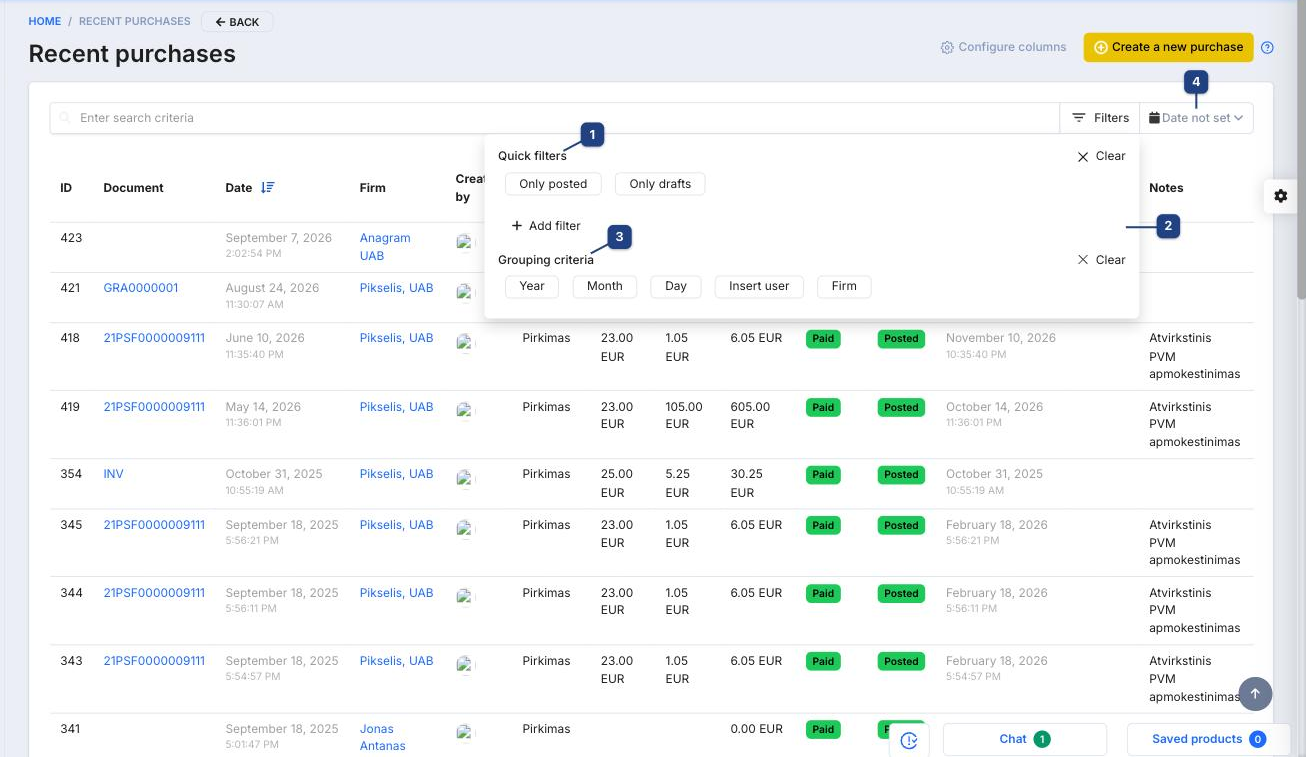
1 Quick filters
Only posted shows confirmed documents; Only drafts shows documents that were saved but not posted yet (they do not affect stock or accounting). Clear removes the quick filter.
2 Add filter
Adds a criterion: Operation (purchase, return, opening balance, debt), Warehouse or Status. Several filters combine.
3 Grouping criteria
Groups the rows with subtotals by Year, Month, Day, Insert user (who entered the document) or Firm (supplier). Useful for a quick "how much did we buy from X per month".
4 Date not set
Limits the list to a document date range. With no date set the newest documents are shown first.
Columns and row actions
The default columns are ID, Document (series and number, opens the purchase), Date, Firm, Created by, Operation, Price without VAT, VAT amount, Purchase amount, Payment (Paid / Unpaid), Status (Posted / Draft), Due date, Amount of debt and Notes. Change them with Configure columns — see Configuring columns.
The icons at the end of a row open the document for editing, delete it (drafts only) and download its PDF. Enter search criteria searches by document number, supplier name and note.
Related
- Creating a purchase / entering stock
- Unentered purchases — supplier invoices waiting to be entered
- Bank statements — where supplier payments are matched